On this page
Dialogue Match is no longer available for purchase, and its maintenance period, including critical updates, ran only through September 24, 2026. If you already own it, you can still download, install and authorize it, and iZotope says the product will not be deactivated. If it is still part of a Pro Tools workflow, keep the approved renders safe and plan how you would rebuild the match with current tools when a session needs revision.
The closest iZotope replacement is a chain built from RX EQ Match, De-reverb and Ambience Match. It covers much of the original work, but it is not a one-click functional equivalent. EQ Match handles spectral balance, De-reverb deals with excess room and Ambience Match supplies the background bed. Microphone perspective, performance, level, timing and reverb stay separate problems, and you still judge each one yourself.
What happened to Dialogue Match?
The Dialogue Match product page says the product is no longer available for purchase. iZotope's support notice adds that the maintenance period, including critical updates, ran through September 24, 2026. That date was never an expiration date for a license you already hold. According to the notice, prior purchases remain available for download, installation and authorization, owned copies will not be deactivated, and technical support is described separately as available for up to 12 months after purchase.
What the notice does not promise is compatibility with future host and operating-system releases. iZotope says it will not actively test Dialogue Match on new operating systems or host versions after September 24, 2026, and the published specification stays as it was: 64-bit AAX AudioSuite only, with Pro Tools 2024 to 2025.6 as the supported hosts. Check what you can still open and render on the machine you have, and keep an authorized installer and the approved audio with your session archive. The date ended maintenance; it was not a plug-in shutdown or a fixed deadline for archiving every project.
What Dialogue Match actually matched
Dialogue Match was built for a familiar post-production problem: two voices belong in the same scene but were recorded through different microphones, rooms or capture paths. Its original workflow combined three jobs:
- EQ matching: bring the broad spectral character of one recording toward a reference.
- Reverb matching: move the perceived room response closer to the reference.
- Ambience matching: make the noise floor and background texture sit in the same world.
The legacy Dialogue Match manual still explains that design well. It is also a reminder that the product was an integrated matching tool, not an EQ preset, so replacing it with EQ alone leaves the room and background mismatch untouched.
What to do with old sessions now
Open your most important old sessions while this workstation still has the plug-in. Check that the insert recalls, the authorization is valid and the session renders without a missing plug-in warning. Then save a new session version before you change anything, and leave the original session untouched.
For each Dialogue Match instance, record the source and target clips, the plug-in preset or settings, the host version, the sample rate, the channel format and the rendered result. If the match is already approved, print a full-length replacement to a new audio file and keep the original processed version beside it. A screenshot of the plug-in window is useful documentation, but it won't stand in for a replacement audio file.
Archive the installer and license information only through the accounts and storage paths you are authorized to use. Skip the unofficial download pages that turn up in search results: they are not evidence of a valid license, a safe installer or current host compatibility.
The closest RX replacement chain
Treat RX as a set of focused stages rather than one magic box. Keep the original dialogue on a protected track, render new files or duplicate clips for each stage, and judge the result from the incoming edit through to the next production line.
1. Start with RX EQ Match
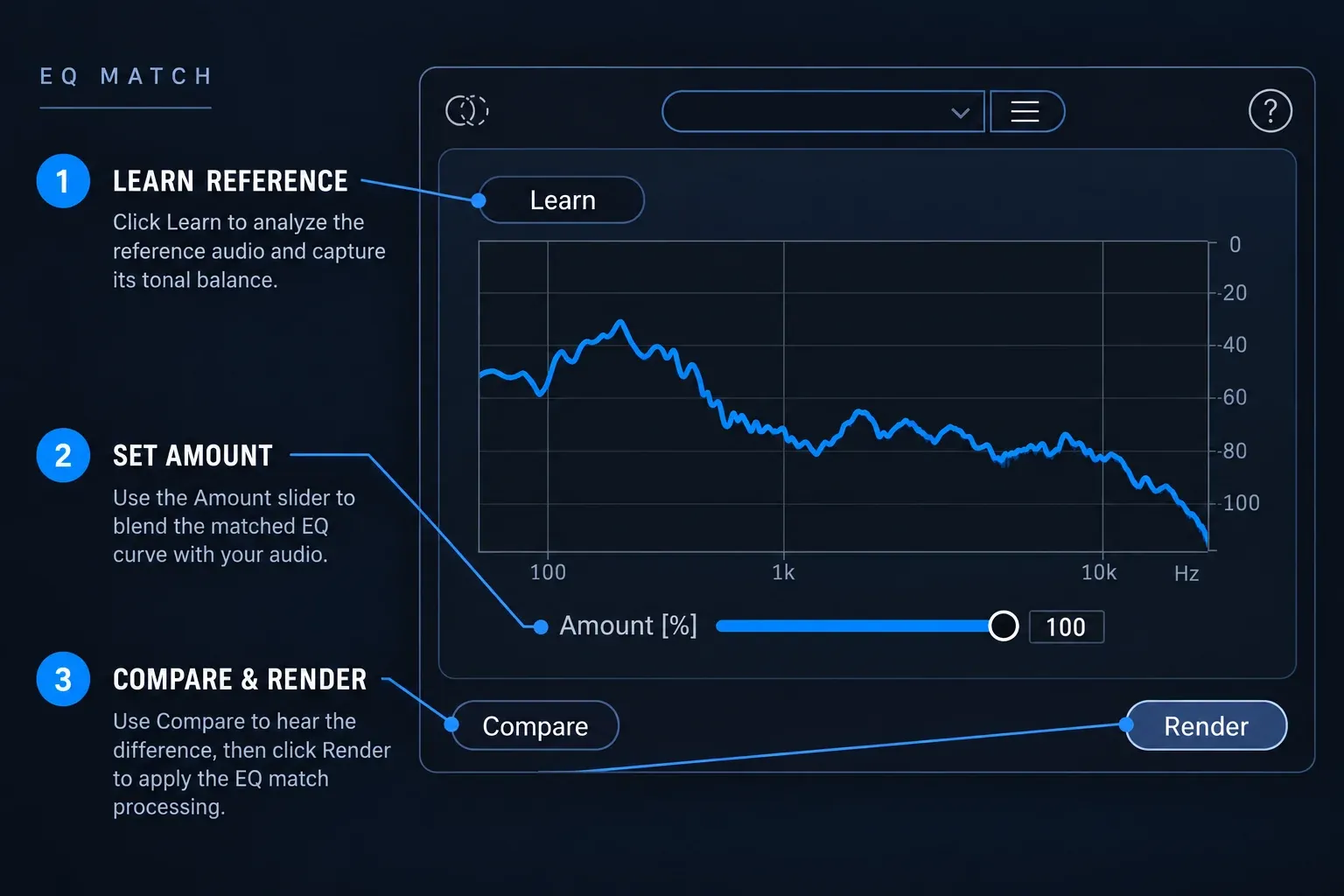
RX EQ Match learns the spectral shape of a reference and applies a correction to the target. Use it when the replacement line sounds too dark, too bright, too thin or too close next to the production reference.
Pick a reference that represents the same speaker, scene and microphone perspective. Avoid learning from a line with a door slam, clothing movement or a strong sibilant unless that event is part of the tonal identity you want to reproduce. The RX 12 documentation describes learning a reference and processing the target, and its illustrated module window labels the action Render. Follow the control names in the RX version you have, and compare the corrected line at the same level as the reference. A louder result often sounds “better” for the wrong reason.
EQ Match can move frequency balance. It cannot repair a different performance, restore missing consonants or put a lavalier at the exact acoustic distance of a boom microphone. If the target still sounds pasted on after a restrained spectral correction, more EQ will not fix it; move on to the next problem.
2. Use De-reverb only when the room is the problem
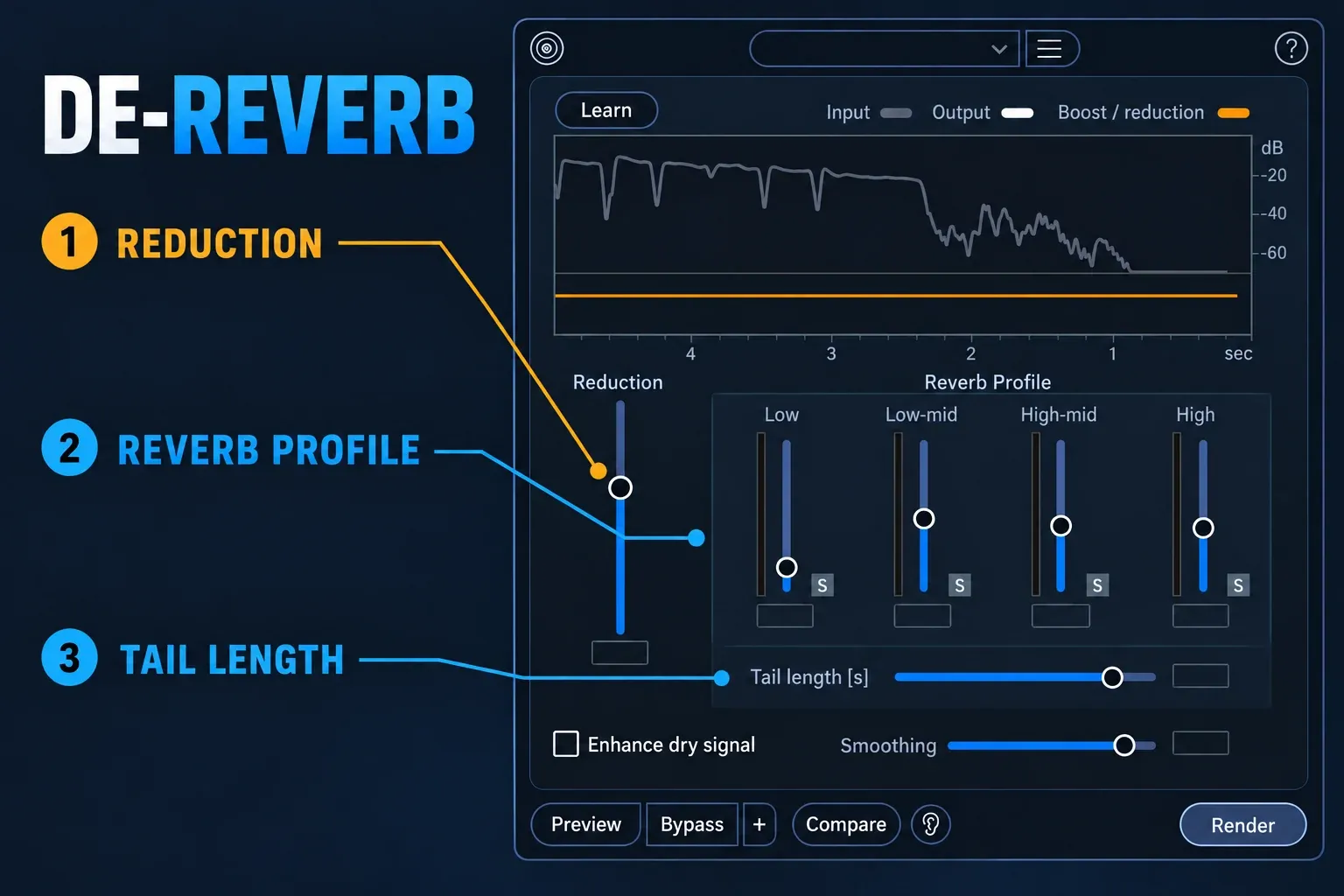
RX De-reverb reduces reverberation in a recording. It earns its place when ADR or a replacement line carries more room than the production dialogue, or when a location recording contains a tail that makes EQ matching misleading.
Don't treat De-reverb as a generic “make it match” button. Push the reduction too far and the voice turns papery, phasey or unnaturally dry. Reduce the unwanted room until the line sits closer to the reference, then add the destination ambience separately; the room correction and the background bed solve different parts of the mismatch.
When the reference is itself reverberant, the better route may be to reduce the target just enough to make its room controllable, then recreate the needed space with the post-production reverb already approved for the scene. RX can reduce a recorded problem. It cannot infer every creative reverb decision made elsewhere in the mix.
3. Finish with Ambience Match
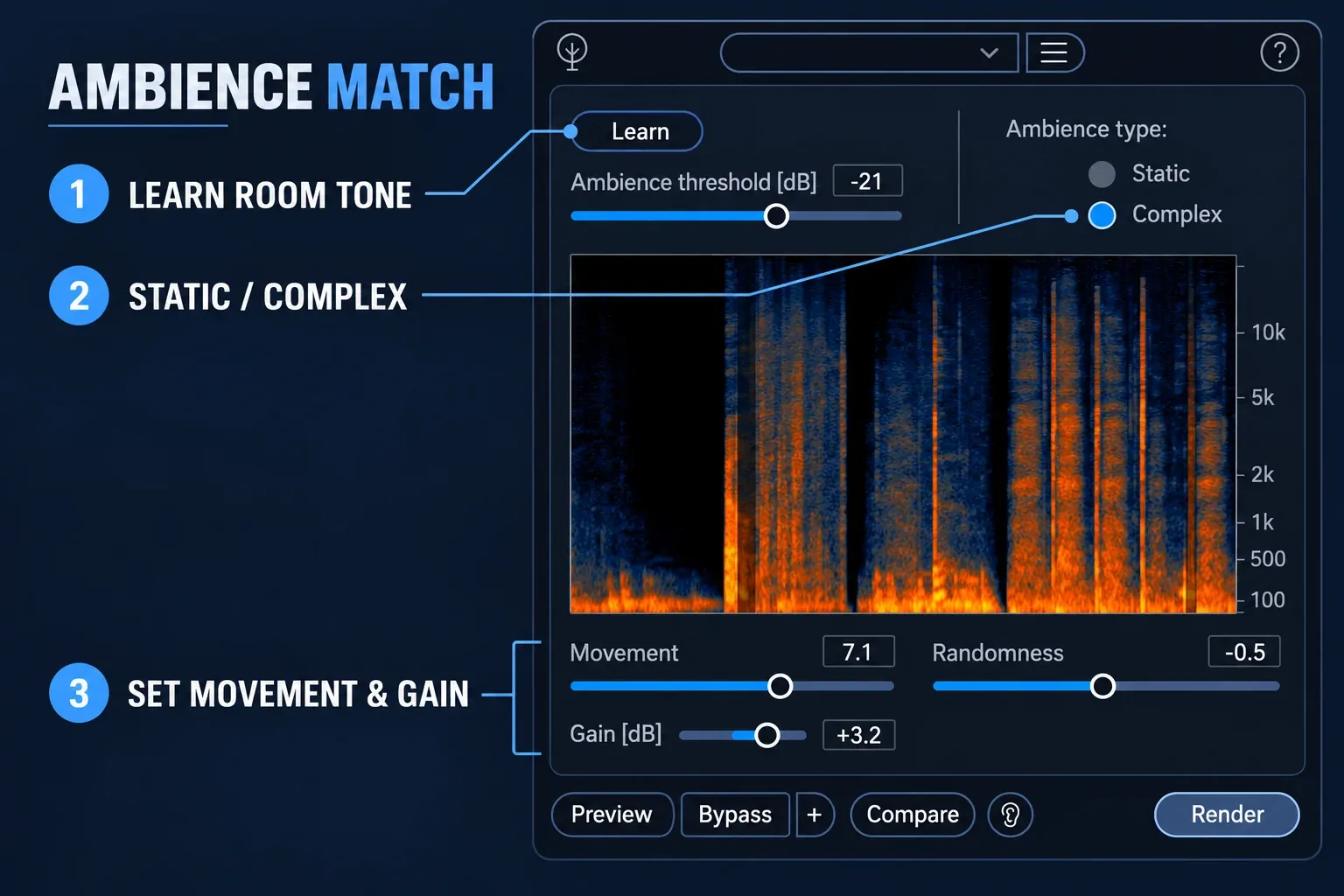
RX Ambience Match learns a background and generates a related ambience bed. Static suits a steady room tone, HVAC or fan; Complex suits a background with movement, such as traffic, crowd texture, birds, wind or fire.
Use a clean reference from the same scene and perspective. When you can, render the bed to a separate file and place it under the replacement line or edit. Level, fades and approval are then easier to reverse, and you avoid replacing useful consonant tails or production effects that happen to share the selected area.
Ambience Match adds or generates background texture. It is not a noise-reduction stage that subtracts a noisy destination while preserving speech. If the target has a louder or different noise floor, reduce that problem first, then add a restrained matched bed. The RX Ambience Match room-tone guide covers the Static and Complex decision in more detail.
Where RX does not replace Dialogue Match
The RX chain is modular, and that is both its strength and its limit. Dialogue Match packaged several matching decisions into one workflow. RX hands you more control, and with it every one of those decisions.
| Mismatch | Closest RX stage | What still needs a human decision |
|---|---|---|
| Too bright, dark, thin or boomy | EQ Match | Reference choice, amount of correction and level matching |
| Too much recorded room | De-reverb | How much room to remove before the voice becomes processed |
| Gap, ADR bed or wrong noise floor | Ambience Match | Reference, mode, level, fades and whether the bed belongs on a separate track |
| Different microphone distance or performance | Combination of edit, EQ and reverb | Perspective, timing, consonants, dynamics and scene intent |
If the replacement still feels detached, stop adding modules and look at the edit. The line may be early, the breath pattern may not belong, the production reference may change perspective or the camera angle may call for a different background. More processing can hide the reason for a mismatch without fixing it.
A safe migration plan
- Inventory the old sessions. List every project, workstation and session that still uses Dialogue Match.
- Open the high-value sessions now. Confirm authorization, recall and a clean render on the current system.
- Print approved matches. Render full-length replacement audio with handles and preserve the original session.
- Document the match. Save the reference names, clip locations, plug-in settings, sample rate and channel format.
- Build an RX test chain. Use EQ Match, De-reverb and Ambience Match on duplicate media, one stage at a time.
- Compare at scene level. Judge the edit in context, not just in solo.
- Archive both versions. Keep the old session, the printed match and the new RX renders together.
On an active production, keep the old plug-in available until the replacement has passed editorial and mix approval. For a finished archive, printed audio is usually worth more than an unverified hope that the legacy plug-in will open years from now.
Pro Tools and AudioSuite considerations
Dialogue Match was closely associated with Pro Tools AudioSuite. When you reopen an old session, check the original clip boundaries, handles and rendered files before changing the insert. If the plug-in is unavailable, don't flatten the session blindly: save a new version, duplicate the affected track and preserve the original media.
For a new RX workflow, use a host format and edition that the current RX release and your workstation support. Check module availability in the RX Advanced module list before you plan a replacement. The old Dialogue Match manual can explain what a legacy setting did; it cannot guarantee that a current RX plug-in, host or operating system will reproduce it exactly.
If the session uses a complicated edit, render a replacement clip with the same duration, sample rate, channels and handles. Bring it into a duplicate track and compare it with the old match. Keep the original clip hidden or muted until the replacement passes the full scene check.
Checklist before removing or replacing Dialogue Match
- The current session opens without an authorization or missing-plug-in warning.
- The original reference and target clips are identified.
- The approved match is printed to a new file with handles.
- Sample rate, channel layout, duration and sync are unchanged.
- The old session and original media remain recoverable.
- The RX replacement is staged as separate EQ, room and ambience decisions.
- Ambience is rendered or placed separately when the edit needs reversible control.
- The replacement is checked in context from the preceding cut through the following line.
The practical goal is continuity, not a perfect recreation of a product you can no longer buy. If an old Dialogue Match render already sounds right, keep it. If you need to rebuild it, use the RX modules for the specific mismatch and leave the rest of the judgment to the edit and the mix.
Related RX workflows
Use the RX Connect in Pro Tools guide for an editor round trip, the RX De-reverb guide for recorded room problems and the RX EQ Match guide for spectral matching. When the mismatch goes beyond one module, the clean dialogue hub maps the wider repair chain.
Frequently asked questions
Is iZotope Dialogue Match discontinued?
The iZotope product page says Dialogue Match is no longer available for purchase. Its support notice says maintenance and critical updates continued through September 24, 2026, so that period has now ended. Technical support is described separately, for up to 12 months after purchase.
Will Dialogue Match stop working on September 24, 2026?
No automatic shutdown was announced. iZotope's notice says owned copies will not be deactivated and existing purchasers can still download, install and authorize the plug-in. The date ended maintenance and critical updates, and compatibility with newer hosts or operating systems is no longer actively tested. Preserve approved renders and session documentation.
What is the best Dialogue Match alternative?
For an iZotope-only workflow, use RX EQ Match for spectral balance, De-reverb for excess recorded room and Ambience Match for the background bed. It is the closest modular replacement, though not a one-click equivalent.
Can RX EQ Match replace Dialogue Match?
No. EQ Match addresses spectral balance. Dialogue Match also addressed reverb and ambience, so EQ Match alone leaves those mismatches for other tools and the mix.
Can RX Ambience Match match ADR to production dialogue?
It can generate a related ambience bed for the ADR or edit. It does not automatically match microphone tone, performance, timing, perspective or recorded reverb. Treat it as one stage of the ADR chain.
Should I keep Dialogue Match installed?
Keep an authorized working copy available while you verify old sessions and print approved matches. Preserve the original installer and session documentation through your normal licensed archive process.
Does RX provide a full one-click replacement?
No. RX supplies the individual tools for much of the same work, but you choose the reference, order, amount, fades and final room perspective. That extra control helps when the problem is unusual, and it calls for a deliberate QC pass.